

Pakistani property owners who have purchased a Hikvision CCTV system face the same decision immediately after buying: handle the installation themselves to save on labour costs, or hire a professional installation team to complete the work correctly. The answer depends entirely on which type of Hikvision system has been purchased, what the property’s cable routing situation looks like, and how technically comfortable the buyer is with electrical connections, cable management, and recorder configuration. A four-camera Hikvision analog system in a single-storey home with accessible ceiling space is a realistic self-installation project for a technically capable Pakistani homeowner with the right tools. A sixteen-camera Hikvision IP system across a multi-storey commercial building with conduit runs through finished walls is a professional installation job regardless of the buyer’s technical ability. This guide covers the complete Hikvision camera installation process for Pakistani properties across both analog DVR and IP NVR system types, including planning, cable routing, camera mounting, recorder setup, and the specific load shedding and power supply considerations that every Pakistani installation must address. For the complete range of Hikvision CCTV camera In Pakistan available through PAK Communications, browse the full selection before reading further.
Contact PAK Communications:
- Phone: (021) 4832293-4
- WhatsApp: 0341-2574866
- Email: info@pakcommunications.com
- Address: Suite #08, 4th Floor, Dar-ul-Furqan Building, Gulshan-e-Iqbal Block 13-B, Main University Road, Karachi
- Hours: Mon-Sat 9:30 AM – 6:30 PM
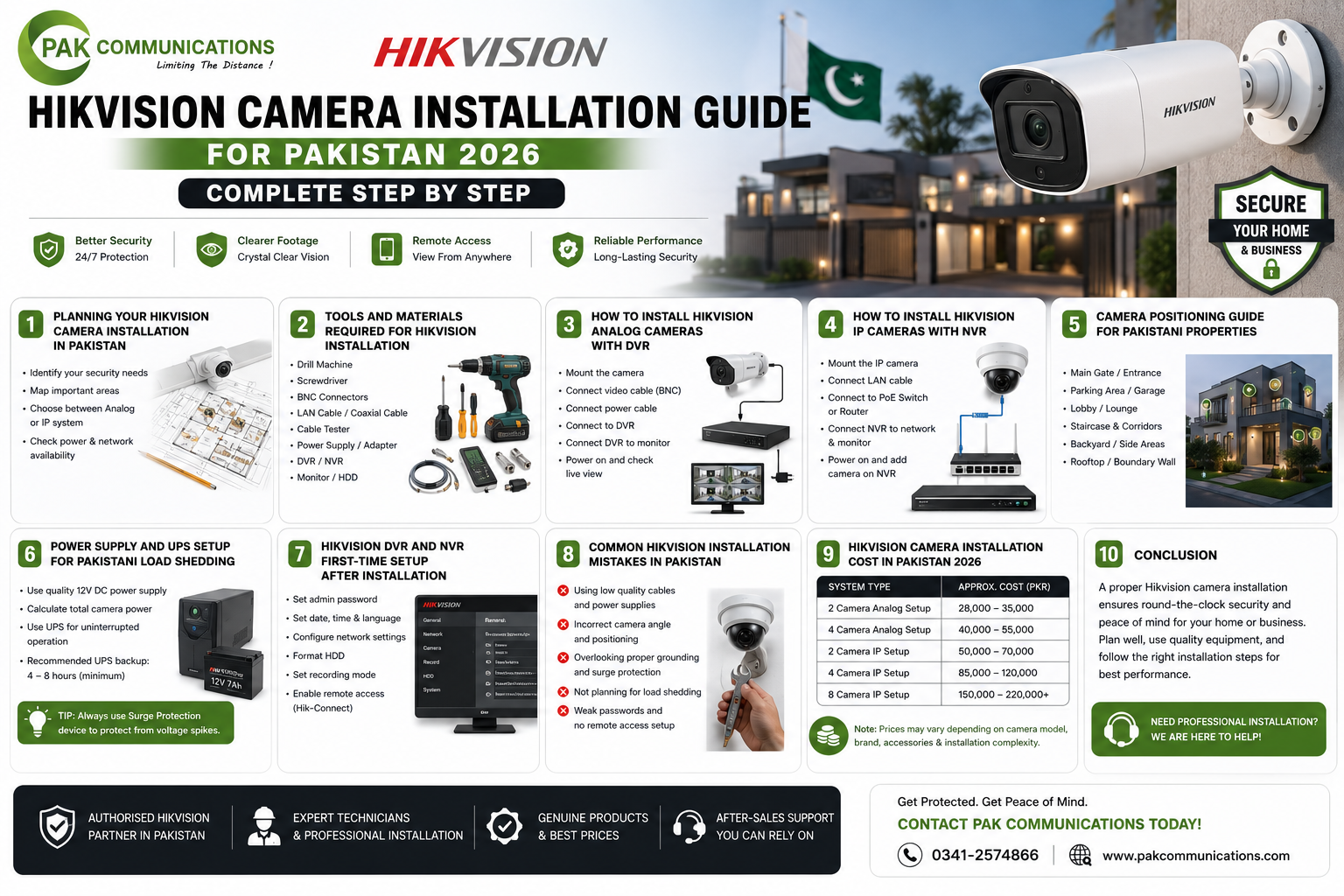
Planning Your Hikvision Camera Installation in Pakistan
Good installation planning completed before any drilling, cable purchasing, or camera mounting begins is what separates a clean, effective Hikvision installation from one that requires partial reinstallation to correct positioning errors, cable routing problems, and coverage gaps that only become visible after the system is running.
Step 1: Draw Your Property Layout and Mark Camera Positions
The first planning step for any Pakistani Hikvision installation is to sketch the property layout on paper or a basic floor plan, marking every area that requires camera coverage. For a Pakistani residential home, the coverage areas to mark are the main gate approach, the car porch, each perimeter wall corner, and the main interior entrance. For a Pakistani retail shop, the coverage areas are the main entrance door, the cashier counter, the shop floor display area, and the storage room entrance. For a Pakistani office, the coverage areas are the building exterior entrance, the reception area, all corridor junctions, and the car park if present.
Once coverage areas are marked, identify the single camera mounting position that covers each area most completely. A camera at a gate pillar covers the gate approach. A camera on the car porch ceiling covers the full porch area. A camera at a corridor ceiling junction covers both corridor directions. Drawing a line from the planned camera position to the coverage area on the sketch confirms whether the camera position actually covers the intended zone before any installation work begins.
Step 2: Plan Cable Routes from Each Camera to the Recorder Location
After camera positions are confirmed on the sketch, draw a cable route from each camera position to the central recorder location. The recorder is typically placed inside the property in a secure location with access to a power socket and to the monitor or television that displays the camera feeds. In Pakistani homes, the recorder is usually placed in a study, bedroom, or living room cupboard. In Pakistani commercial properties, the recorder is placed in a secure back office, server room, or manager’s office.
The cable route from each camera position to the recorder must navigate the physical structure of the property. In a single-storey Pakistani home with a flat roof, cables can often be routed across the roof surface in conduit and brought down through a single entry point into the ceiling space above the recorder location, making cable management significantly simpler than routing through finished interior walls. In a multi-storey Pakistani property, vertical cable runs between floors require either existing conduit, surface conduit on exterior walls, or drilling through floors at appropriate positions.
Measure each cable route length on the sketch and add 20 percent to each measurement to account for route bends, wall entry points, and the cable slack needed at both the camera end and the recorder end for clean connection. This measured length plus 20 percent is the cable quantity to purchase for each camera run.
Step 3: Confirm Camera Types and Recorder Compatibility
Before purchasing any installation materials, confirm that the cameras and recorder in the system are compatible with each other. Hikvision Turbo HD analog cameras connect to Hikvision DVR recorders via coaxial cable. Hikvision IP cameras connect to Hikvision NVR recorders via Cat6 network cable. Hikvision WiFi cameras connect to an NVR or operate as standalone devices connected to a router. Mixing an IP camera with a DVR, or a Turbo HD analog camera with an NVR, produces a system that does not function, and this basic compatibility error is one of the most common and costly mistakes Pakistani buyers make when assembling a Hikvision system from separately purchased components.
Tools and Materials Required for Hikvision Installation in Pakistan
A complete Hikvision installation in a Pakistani property requires a specific set of tools and materials beyond the cameras and recorder themselves. Purchasing these before starting the installation prevents work stoppages caused by missing items discovered mid-installation.
Tools Required
A power drill with masonry bits of 6mm and 10mm diameter is required for drilling camera bracket mounting holes in Pakistani concrete and brick walls, which are the standard wall materials in Pakistani residential and commercial construction. A cable fish tape or cable pulling rod is required for pulling cables through conduit runs and through ceiling spaces where direct access to the cable path is not available. A cable stripper and RG59 compression tool are required for terminating coaxial cable connections on analog installations. A Cat6 cable crimping tool and RJ45 connectors are required for terminating Cat6 network cable on IP installations. A screwdriver set, wall plugs, cable clips, and a spirit level for bracket alignment complete the basic tool requirement for a standard Pakistani Hikvision installation.
Materials Required for Analog DVR Installation
An analog DVR installation in a Pakistani property requires RG59 coaxial cable, which is the standard cable for Hikvision Turbo HD analog camera connections in Pakistan. Standard RG59 cable in Pakistan is sold by the metre or in 100-metre rolls at electrical supply shops and authorized CCTV dealers. BNC connectors for the coaxial cable terminations at both the camera end and the DVR end, DC power adapters for each camera position, a power distribution box if multiple cameras are being powered from a single source, PVC conduit for outdoor cable protection, and cable clips or cable trunking for indoor surface cable runs complete the material list for a standard analog installation.
Materials Required for IP NVR Installation
An IP NVR installation requires Cat6 UTP network cable rather than coaxial cable. Cat6 cable is available in Pakistan by the metre or in 305-metre bulk rolls. For a PoE NVR installation, where the NVR powers IP cameras over the Cat6 cable, no separate camera power supplies are needed as long as the cable runs are within the 100-metre maximum PoE cable length. For IP camera positions beyond 100 metres from the NVR, either a PoE extender or a separate power supply at the camera position is required. RJ45 connectors, a Cat6 crimping tool or pre-terminated Cat6 patch cables for short indoor runs, PVC conduit for outdoor cable protection, and cable clips or trunking for surface cable management complete the IP installation material list.
How to Install Hikvision Analog Cameras with DVR
Step 1: Mount the DVR at the Recorder Location
Place the Hikvision DVR at the chosen recorder location before beginning any cable work. Connect the DVR to the monitor or television using an HDMI cable for HD output. Connect the DVR to a power socket through a UPS unit sized appropriately for the DVR’s power consumption plus the power consumption of all connected cameras. Power on the DVR and confirm that the initial setup interface appears on the monitor before proceeding with camera installation.
Step 2: Run Coaxial Cable from Each Camera Position to the DVR
Starting from the DVR location and working toward each camera position is the most practical cable routing direction for Pakistani analog installations, because pulling cable from the recorder outward allows the installer to confirm cable length before cutting and to leave the correct amount of slack at the recorder end for clean connection to the DVR’s BNC inputs.
Route the coaxial cable from the DVR location along the planned cable route to each camera position, securing the cable with cable clips at regular intervals on interior surfaces and running the cable through PVC conduit on exterior surfaces and roof crossings where weather protection and physical protection from interference are required. At each camera position, leave 50 to 60 centimetres of cable slack beyond the camera bracket mounting point for the BNC connector termination and the connection to the camera’s video input.
Step 3: Terminate BNC Connectors on Coaxial Cable
At both the camera end and the DVR end of each coaxial cable run, terminate a BNC connector using the RG59 compression tool. Strip the coaxial cable outer jacket by 15mm to expose the braided shield, fold the braided shield back over the outer jacket, strip the inner insulation by 5mm to expose the centre conductor, insert the prepared cable end into the BNC compression connector, and compress the connector with the compression tool until the connector is firmly fixed on the cable. A poorly terminated BNC connector is the most common cause of signal loss, image noise, and complete signal failure in Pakistani analog CCTV installations, so correct BNC termination technique is worth practising on a short cable offcut before terminating the main cable runs.
Step 4: Mount Camera Brackets and Connect Cameras
At each camera position, hold the camera bracket against the wall or ceiling surface at the planned mounting height and angle, mark the bracket mounting hole positions with a pencil, drill the marked positions with the appropriate masonry bit, insert wall plugs, and secure the bracket with the supplied screws. Connect the terminated BNC connector from the coaxial cable to the camera’s BNC video output, connect the DC power connector from the camera’s power supply to the camera’s power input, and mount the camera body on the bracket by rotating the camera into the bracket lock position.
Step 5: Connect Cables at the DVR End
At the DVR, connect each coaxial cable’s BNC connector to the corresponding channel BNC input on the DVR’s rear panel. Label each cable at the DVR end with the camera position name before connecting to make future maintenance and fault-finding straightforward. Connect each camera’s power supply to the power distribution box or individual power sockets at the recorder location, confirm all power supplies are plugged into the UPS-protected circuit, and power on the cameras by switching on the power distribution box.
How to Install Hikvision IP Cameras with NVR
Step 1: Mount the NVR and Plan PoE Channel Assignments
Place the Hikvision NVR at the recorder location and connect it to the monitor via HDMI. Before running any Cat6 cable, assign each planned camera position to a specific NVR channel number and note this assignment on the installation plan sketch. Knowing which channel each camera will connect to before running cable prevents the confusion that results from unlabelled cable runs arriving at the NVR in an unplanned order.
For the complete current range of Hikvision IP camera in Pakistan across all resolution tiers and series available for IP NVR installation, the full current stock and pricing is listed on the PAK Communications Hikvision IP camera page. Confirming camera models and NVR channel compatibility before purchasing ensures the installation proceeds without compatibility issues discovered after purchase.
Step 2: Run Cat6 Cable from NVR to Each Camera Position
Run Cat6 UTP cable from the NVR location to each camera position using the same cable routing principles as the analog installation. The critical difference with Cat6 cable for PoE IP camera installations is the 100-metre maximum cable length between the NVR’s PoE port and the camera. Any Cat6 run exceeding 100 metres must use a PoE extender at the midpoint of the run or a separate 12V DC power supply at the camera position rather than relying on PoE power delivery over the full cable length.
Protect Cat6 cable on outdoor runs in PVC conduit sealed at both ends against water ingress. The conduit end seal at the wall entry point is particularly important for Pakistani outdoor installations where monsoon rainfall and roof drainage create water pressure at external wall surfaces that can drive water into unsealed conduit and along the cable to the camera connector and the NVR port.
Step 3: Terminate RJ45 Connectors on Cat6 Cable
At each camera end of the Cat6 run, terminate an RJ45 connector using the T568B wiring standard, which is the correct standard for Hikvision PoE camera connections in Pakistan. Strip 25mm of the Cat6 outer jacket, untwist the four wire pairs, arrange the eight conductors in the T568B order (orange-white, orange, green-white, blue, blue-white, green, brown-white, brown), trim the conductors to equal length, insert into the RJ45 connector with the tab facing down, and crimp firmly with the RJ45 crimping tool. At the NVR end of the run, either terminate a second RJ45 connector using the same T568B standard or connect a short factory-made patch cable between the Cat6 run’s wall socket outlet and the NVR’s PoE port.
Step 4: Mount IP Camera Brackets and Connect Cameras
Mount IP camera brackets using the same drill and wall plug procedure as the analog installation. Connect the terminated Cat6 RJ45 connector to the camera’s network port. For PoE cameras, this single Cat6 connection provides both the network data connection and the power supply from the NVR’s PoE port simultaneously, with no separate power connection required at the camera position. The camera powers on automatically when the Cat6 cable is connected to an active NVR PoE port and the NVR is powered.
Camera Positioning Guide for Pakistani Properties
Correct camera positioning determines whether the installed system covers its intended areas with the image quality required for its surveillance purpose. The following positioning guidelines apply to the most common camera positions in Pakistani residential and commercial properties.
Gate and Entrance Positioning
A camera covering the main gate approach of a Pakistani property should be mounted at a height of 2.5 to 3.5 metres on the gate pillar or boundary wall, aimed at the approach path at a downward angle of 15 to 25 degrees. This mounting height and downward angle captures both the facial area of an approaching adult at distances of 3 to 15 metres and the front number plate of an approaching vehicle at the same distance range, which are the two primary identification requirements at a Pakistani residential gate position.
Avoid mounting gate cameras higher than 3.5 metres, because excessive mounting height produces a steep downward angle that captures the top of a subject’s head rather than their face, reducing identification quality regardless of the camera’s resolution. Avoid mounting gate cameras lower than 2 metres, because low mounting positions are vulnerable to deliberate interference and produce upward-looking images of approaching subjects that miss number plate detail.
Ceiling-Mounted Indoor Camera Positioning
Dome cameras ceiling-mounted in Pakistani shop floors, office corridors, and reception areas should be positioned at ceiling junction points where the camera’s field of view covers the maximum useful floor area below. In a corridor, the ceiling junction at the point where two corridors meet allows a single wide-angle dome camera to cover both corridor directions simultaneously. In a shop floor, the ceiling centre point above the main display area allows a single wide-angle dome camera to cover the full floor area without blind spots in corners.
At ceiling heights between 2.5 and 3.5 metres, a standard 2.8mm wide-angle dome camera covers a floor diameter of 5 to 8 metres with identification-quality resolution. At ceiling heights above 4 metres, a varifocal dome camera allows the installer to adjust the lens angle after mounting to optimise floor coverage for the specific ceiling height.
Perimeter Wall Camera Positioning
Cameras mounted on Pakistani property perimeter walls for boundary coverage should be positioned at wall height of 2.5 to 3 metres, aimed outward along the boundary exterior at a slight downward angle. The camera’s coverage zone along the boundary extends approximately 15 to 25 metres horizontally from the mounting position with a 4mm lens, which determines the required spacing between cameras on a continuous perimeter boundary coverage installation.
Power Supply and UPS Setup for Pakistani Load Shedding
Every Hikvision camera installation in Pakistan must include a UPS power backup solution for the cameras and recorder to maintain continuous recording during load shedding. A Hikvision DVR or NVR that loses power during load shedding stops recording at the moment of power cut, producing a gap in the footage record that covers the full duration of the load shedding event. For Pakistani properties where after-dark load shedding periods are the highest security risk hours, this recording gap represents a complete failure of the surveillance system during the hours when it matters most.
Sizing the UPS for a Hikvision Installation
The UPS must be sized to power the total watt consumption of the DVR or NVR, all connected cameras, and the monitor simultaneously for the expected duration of a single load shedding event plus a reasonable margin. Calculate the total system power consumption by adding the DVR or NVR power consumption from its specification label, the power consumption of all cameras from their specification labels, and the monitor power consumption. A typical four-camera Hikvision analog system with a DVR and small monitor consumes between 50 and 80 watts total. A typical eight-camera IP NVR system with PoE cameras and a monitor consumes between 80 and 150 watts total depending on the NVR model and camera specifications.
For two hours of UPS backup at 100 watts total consumption, a 600VA or 1000VA UPS with a new battery is appropriate for most Pakistani residential Hikvision installations. For longer backup durations at commercial installations with higher total system power consumption, a larger UPS capacity or an external battery bank connected to the UPS is required.
Connecting the Hikvision System to UPS Power
Connect the DVR or NVR power adapter, the camera power distribution box for analog systems, and the monitor power cable to the UPS output sockets rather than directly to the mains socket. The UPS should also power the internet router and modem if Hik-Connect remote access during load shedding is required, as described in the Hik-Connect setup guide. Plug the UPS input into a dedicated mains power socket and confirm that the UPS powers on, completes its self-test, and shows a healthy battery status before considering the power backup setup complete.
Hikvision DVR and NVR First-Time Setup After Installation
After all cameras are physically installed and connected to the recorder, the DVR or NVR requires first-time software configuration before the system begins recording correctly.
Setting the Administrator Password
Power on the DVR or NVR and follow the first-time setup wizard that appears on the monitor. The first step is setting a strong administrator password for the recorder. This password protects the recorder’s settings and the recorded footage from unauthorized access. Pakistani buyers who leave the default password or set a simple password on their Hikvision recorder expose their system to unauthorized remote access through the Hik-Connect platform. Set a password of at least eight characters including letters and numbers and record it securely alongside the serial number of the recorder.
Setting Pakistan Standard Time
In the recorder’s system settings, set the time zone to Asia/Karachi, which is Pakistan Standard Time at UTC plus 5 hours. Enable the NTP automatic time synchronization option so the recorder maintains accurate time from an internet time server rather than drifting from the correct time over weeks and months. Incorrect time settings produce footage timestamps that do not correspond to the actual time of recorded events, which makes the footage unreliable for any evidentiary or insurance purpose.
Configuring Hard Drive Recording
Navigate to the storage settings in the DVR or NVR menu and confirm that the installed hard drive is detected and initialized. Set the recording mode to continuous recording for standard installations, which records footage from all cameras continuously throughout the day and night and overwrites the oldest footage when the hard drive reaches capacity. For installations where storage duration is a priority, motion-triggered recording reduces daily storage consumption significantly by recording only when camera motion detection is active, extending the footage retention period on the same hard drive capacity.
Setting Up Hik-Connect Remote Access
In the recorder’s network settings, enable the Hik-Connect platform access option and confirm that the recorder shows a connected status on the Hik-Connect platform interface within the menu. Note the QR code displayed on the Hik-Connect platform settings screen, which is used to add the recorder to the Hik-Connect mobile app on the property owner’s smartphone. The complete Hik-Connect app setup procedure from QR code scan through live view confirmation and motion alert configuration is covered in the Hikvision Hik-Connect app setup guide.
For complete guidance on selecting the correct channel count, PoE power budget, and hard drive size for a Hikvision NVR in a Pakistani installation before beginning the setup process, the detailed specification reference is available in the Hikvision NVR price in Pakistan buyer’s guide.
Common Hikvision Installation Mistakes in Pakistan
Pakistani CCTV installers, both professional and self-installing, consistently make a small set of installation mistakes that reduce system performance and create maintenance problems that appear weeks or months after the initial installation is complete.
Using Substandard Cable on Long Runs
The most common and most damaging installation mistake in Pakistani Hikvision analog installations is using low-quality RG59 coaxial cable on runs exceeding 30 metres. Substandard coaxial cable in the Pakistani market, which is widely available at prices significantly below genuine copper-core RG59 cable, uses copper-clad aluminium rather than solid copper for the centre conductor. This material substitution produces acceptable signal quality on short cable runs of 15 to 20 metres but causes significant signal degradation on longer runs that manifests as image noise, color distortion, and intermittent signal loss at the DVR. Always purchase genuine copper-core RG59 coaxial cable from a reputable supplier for any analog camera run exceeding 20 metres.
For IP NVR installations, using Cat5e cable rather than Cat6 cable on PoE camera runs is the equivalent mistake. Cat5e cable is adequate for standard network data at short distances but produces PoE power delivery problems at longer distances and does not support the higher data rates that 4MP and 8MP IP cameras require for clean full-resolution streaming to the NVR.
Inadequate Outdoor Cable Weatherproofing
Failing to seal conduit entry points and camera bracket cable entries against water ingress is a common mistake in Pakistani outdoor camera installations that produces camera failures and cable damage during the first monsoon season after installation. Every point where a cable exits the camera bracket housing and every point where a cable enters a wall or roof surface must be sealed with waterproof silicone sealant or weatherproof gland fittings to prevent water from tracking along the cable into the connector and the camera’s internal electronics.
Incorrect Camera Height and Angle
Mounting cameras at incorrect heights, specifically too high or aimed too steeply downward at gate positions, and too low or aimed too horizontally at ceiling positions, is an installation error that produces poor footage quality regardless of the camera’s specification. A 4MP camera mounted at 5 metres height and aimed steeply downward at a gate position produces worse identification quality footage than a 2MP camera mounted correctly at 3 metres height with the correct aiming angle, because the 4MP camera’s resolution advantage is lost when the subject’s face is never in the optimal identification zone of the camera’s field of view.
No UPS Protection on the Recorder
Installing a Hikvision recorder without UPS power backup is an installation mistake that renders the entire system ineffective during Pakistani load shedding, which typically occurs during the evening and night hours when surveillance is most needed. Every Hikvision recorder installation in Pakistan should include UPS backup as a standard component of the system rather than an optional add-on.
Hikvision Camera Installation Cost in Pakistan 2026
Professional Installation Labour Rates Pakistan 2026
Professional CCTV installation labour rates in Pakistan vary by city, system complexity, and the installer’s experience level. In Karachi, Lahore, and Islamabad, professional installation teams typically charge between Rs 2,000 and Rs 4,000 per camera for standard residential installations including cable routing, camera mounting, DVR or NVR setup, and basic system testing. This per-camera rate covers a standard installation where cable routing is accessible through ceiling space or along exterior wall surfaces without complex concealed conduit work through finished walls.
Installations requiring concealed cable routing through finished walls, complex multi-storey vertical cable runs, or large commercial properties with 16 or more camera positions are typically priced on a project basis rather than a per-camera rate, with project prices ranging from Rs 25,000 to Rs 150,000 or more depending on the scale of the installation and the complexity of the cable routing.
Material Costs for Pakistani Hikvision Installation 2026
Beyond the camera and recorder hardware, a standard four-camera Hikvision installation in a Pakistani residential property requires approximately Rs 3,000 to Rs 6,000 in installation materials including coaxial or Cat6 cable, conduit, BNC or RJ45 connectors, cable clips, wall plugs, power distribution components, and miscellaneous fasteners. An eight-camera installation requires approximately Rs 5,000 to Rs 10,000 in materials. These material estimates assume standard Pakistani residential construction with accessible cable routing and average cable run distances.
Conclusion: Getting Your Hikvision Installation Right in Pakistan
A correctly planned and installed Hikvision camera system in a Pakistani property delivers reliable, high-quality surveillance footage from day one of operation and continues delivering without maintenance issues for five to seven years with minimal intervention. The planning steps, cable quality decisions, weatherproofing details, camera positioning principles, and UPS setup covered in this guide represent the difference between a system that performs as intended and one that requires costly remedial work within its first year of operation.
Pakistani property owners who want professional installation of their Hikvision system by an experienced team, or who want pre-purchase guidance on camera selection, cable routing planning, and system specification for their specific property, can contact PAK Communications directly for a free consultation. Browse the complete range of Hikvision analog camera in Pakistan and IP camera options at PAK Communications, or WhatsApp 0341-2574866 to discuss your installation requirements before ordering.