

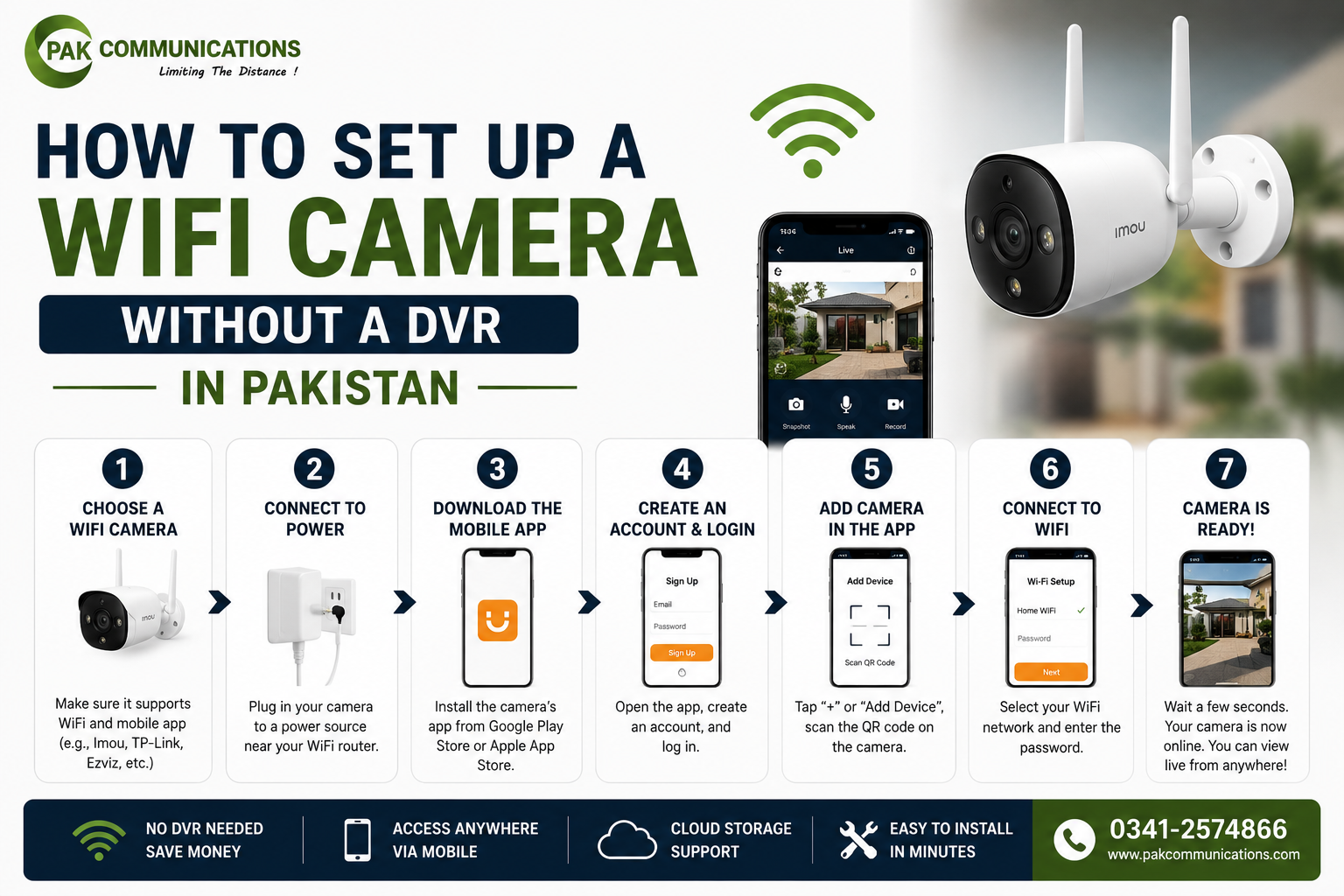
A WiFi camera without a DVR records onto a microSD card inside the camera and sends motion alerts to your phone through the Hik-Connect app: no recorder, no extra hardware, no cable routing through walls. If you are considering a standalone camera wifi for a rented apartment, finished property, or a single gate or door position, this guide covers everything from pre-setup requirements to the most common problems Pakistani users face after installation.
Why Pakistani Buyers Choose WiFi Cameras Without a DVR
No Recorder Cost: Camera Stores Footage on MicroSD Card
A standalone WiFi camera records directly to a microSD card inside the camera, removing the recorder entirely from the cost. A 64GB card in Pakistan costs PKR 1,500 to PKR 2,500 and provides days of continuous or weeks of motion-triggered recording. For single-camera gate or apartment door setups, total system cost is considerably lower than any DVR-based alternative.
Easy Installation in Finished Pakistani Properties
WiFi cameras need only a power cable at the mounting position. There is no coaxial or Cat6 cable to route back to a recorder room, no conduit to install across finished walls and no centralised hardware unit to locate. This makes WiFi cameras the default choice for Karachi tenants who cannot make permanent structural changes to rented properties and for homeowners in completed interiors where cable routing would require breaking into walls.
Remote Access Through Hik-Connect Without Extra Hardware
Once connected to your WiFi network, the camera streams live footage directly to the Hik-Connect app from any location with internet access. You can view live video, review microSD clips and receive alerts with no intermediate hardware. This direct connection is why standalone WiFi cameras are now the default apartment security setup across Pakistan.
What You Need Before Setting Up a WiFi Camera Without DVR
MicroSD Card Selection for Pakistani Cameras
Use a Class 10 or UHS Speed Class 3 (U3) microSD card with a capacity of 64GB or 128GB. Samsung Evo Plus, SanDisk High Endurance and Kingston Canvas Select are all available in Pakistan and suitable for continuous CCTV recording workloads. Standard Class 4 or Class 6 cards are too slow for continuous video writing and will cause recording errors within weeks. Check your camera’s specification for the maximum supported card size before purchasing, as some models cap at 64GB.
Power Supply Options at the Camera Position
WiFi cameras require a continuous 12V DC or 5V DC supply at the mounting position depending on the model. For outdoor positions, use a weatherproof power adapter or route a DC cable from an indoor socket through the wall. If no socket is nearby, a PoE injector using an existing Cat5 or Cat6 cable can deliver power without a separate electrical run. Match the power supply voltage and current rating to your camera’s specification to avoid damage.
WiFi Signal Check at the Mounting Position
Before fixing the bracket, check WiFi signal strength at the exact mounting position using your phone. Most standalone WiFi cameras support only the 2.4GHz band, which penetrates walls better than 5GHz and is the standard broadcast frequency of most Pakistani home routers. Confirm the signal is stable at the proposed position. A weak signal causes dropped connections, buffering on live view and missed motion event uploads. If signal is poor at the position, install a WiFi extender at an intermediate point before proceeding with installation.
Hik-Connect App Download
Download the Hik-Connect app from the Google Play Store or Apple App Store before mounting the camera. Create an account using your mobile number. You will need these credentials during the camera connection step. Hik-Connect is the standard remote access platform for Hikvision WiFi cameras in Pakistan, is free to use and supports multiple cameras within a single account.
Step by Step WiFi Camera Setup Without DVR in Pakistan
Before starting, confirm your camera includes microSD recording support and Hik-Connect compatibility. Review cctv camera wifi price in pakistan across available models to verify these features are included before purchasing, as some entry-level models sold in Pakistan require a paid cloud plan for footage storage.
Step 1: Mount the Camera and Connect Power
Fix the mounting bracket at the chosen position using the supplied screws and wall plugs. Route the power cable from the nearest socket and connect it to the camera’s DC input. Seal any external cable entry with waterproof silicone. Power on the camera and wait 30 to 60 seconds for startup to complete before proceeding.
Step 2: Insert the MicroSD Card
Locate the microSD slot on the camera body, typically behind a small cover on the underside or rear. Insert the card firmly until it clicks into place. The camera detects and initialises the card automatically within a few seconds. If the card is not detected, remove it, format it as exFAT on a computer and reinsert.
Step 3: Download and Create Hik-Connect Account
Open the Hik-Connect app. If you have not registered, tap Register, enter your mobile number and verify with the SMS code sent to your phone. Sign in with your new credentials. Your device list will be empty at this stage.
Step 4: Scan QR Code and Connect to Home WiFi
Tap the plus icon in the Hik-Connect app and select Scan QR Code. Scan the QR code label on your camera body. The app prompts you to enter your 2.4GHz WiFi network name and password. Enter these and confirm. The camera connects within 60 to 90 seconds. When the camera appears in your device list with a green status indicator, tap it to confirm live view is working.
Step 5: Configure Motion Detection Zone
In the camera settings within Hik-Connect, open Motion Detection and draw the alert zone over the relevant part of the frame. For a gate camera, confine the zone to the entrance area and exclude nearby trees, road traffic or other movement sources outside your property. A correctly sized zone dramatically reduces false alerts from wind and passing traffic, which are common sources of notification overload in Pakistani daytime conditions.
Step 6: Set Up Push Notifications
In Hik-Connect settings, confirm push notifications are enabled for your camera. On Android, go to your phone’s App Management settings, find Hik-Connect, set battery optimisation to No Restriction and add it to the protected apps list if your phone offers this option. Pakistani Android devices running MIUI, ColorOS and similar custom skins restrict background app notifications by default. Skipping this step is the most common reason motion alerts fail to arrive reliably after setup.
MicroSD Storage Guide for Pakistani WiFi Cameras
Storage duration depends on resolution, compression type and recording mode. Every wifi cctv camera model varies, but the figures below apply to current Hikvision WiFi cameras using H.265 compression at 15 frames per second.
How Many Days Does 64GB Store at 1080p?
At 1080p continuous recording with H.265 compression, a 64GB card stores approximately 5 to 7 days before overwriting. On motion-triggered recording at the same resolution in a residential setting with moderate activity, the same card retains 20 to 30 days of clips. For most single-camera gate or door setups in Pakistan, motion-triggered recording on 64GB provides sufficient retention.
How Many Days Does 128GB Store at 4MP?
At 4MP continuous with H.265 compression, a 128GB card stores approximately 4 to 5 days. At 4MP on motion-triggered recording with moderate activity, the same card retains approximately 15 to 20 days of clips. The higher bitrate of 4MP reduces storage duration compared to 1080p at the same compression. If your position requires 4MP resolution and extended retention, 128GB is the recommended minimum card size.
Continuous vs Motion-Triggered Recording: Which to Use
Motion-triggered recording is the recommended setting for Pakistani residential WiFi camera setups. It extends card life considerably, makes finding relevant footage faster in playback and avoids filling the card with hours of empty footage. Continuous recording suits high-activity commercial positions such as shop entrances or building lobbies where footage gaps carry a higher consequence.
Load Shedding and WiFi Camera Storage in Pakistan
Does the Camera Keep Recording During Load Shedding?
A WiFi camera continues recording to its microSD card during load shedding only if it has backup power from a UPS or battery. Without backup power, the camera shuts down the moment load shedding begins and records nothing until mains power returns. Footage already on the microSD card before the outage is preserved. Only a UPS at the camera’s power point ensures uninterrupted recording through load shedding.
How to Maintain Notifications During Load Shedding
Push alerts require both an active camera and an active internet connection. If load shedding cuts power to your router, notifications stop reaching your phone even if the camera has its own backup. Connecting the WiFi router to a small UPS or power bank keeps internet active throughout standard load shedding durations and maintains uninterrupted alerts. A router drawing 10 to 15 watts runs for several hours on a modest power bank.
UPS Setup for WiFi Camera and Router
Connect both the camera power adapter and the WiFi router to a 600VA UPS. Combined draw is typically 15 to 25 watts, providing several hours of runtime through a standard residential load shedding cycle. Test by switching off mains and confirming both camera and live view remain active on your phone.
Common WiFi Camera Setup Problems in Pakistan and Fixes
Camera Not Connecting to WiFi
The most common cause is a 5GHz network. Most Pakistani home routers broadcast both 2.4GHz and 5GHz bands. If your camera only supports 2.4GHz, select the 2.4GHz network specifically during setup. If your router uses one name for both bands, separate them temporarily in the router settings. Weak signal at the mounting position is the second most common cause. Complete the initial pairing near the router, confirm connection, then move the camera to the mounting position.
MicroSD Card Not Detected
Remove the card, format it as exFAT on a Windows computer, reinsert firmly until it clicks and restart the camera. Standard Class 4 or Class 6 cards frequently cause detection failures in continuous recording applications. If a correctly formatted U3 card is still not detected, test with a second card to rule out a faulty unit.
No Push Notifications on Pakistani Android Phones
Pakistani Android skins including MIUI, ColorOS and FunTouch OS restrict background app activity by default. In your phone settings under App Management, set Hik-Connect battery optimisation to No Restriction and enable autostart if the option exists. After making these changes, trigger a test by walking in front of the camera and confirm the alert arrives within 30 seconds.
Poor Video Quality on Mobile Data
Slow mobile data is the usual cause, not a camera fault. In the Hik-Connect app, switch from Main Stream to Sub Stream in the video quality settings. Sub Stream uses a fraction of the bitrate and delivers smooth playback on limited Jazz, Ufone, Zong or Telenor data speeds. Main Stream HD quality remains available when viewing on your home WiFi.
Frequently Asked Questions
Can a WiFi Camera Record Without Internet in Pakistan?
Yes. The camera records to its microSD card using its own local motion detection regardless of internet availability. Internet is needed only for remote live view, push notifications and cloud clip access. If load shedding cuts the router but the camera has backup power, local recording to the microSD card continues normally.
How Long Does a 64GB Card Last in a 4MP WiFi Camera?
At 4MP continuous recording with H.265 compression, a 64GB card stores approximately 2 to 3 days before overwriting. On motion-triggered recording with moderate activity, it retains approximately 10 to 15 days of clips. For a gate position with intermittent activity, motion-triggered on 64GB is adequate.
Can I View a WiFi Camera Without DVR on My Laptop?
Yes. Hik-Connect provides a web portal at hik-connect.com where you can log in with the same credentials as the mobile app. The portal supports live view, clip playback and camera configuration without installing any software.
What Happens to WiFi Camera Footage During Load Shedding?
If the camera has UPS backup power, recording continues uninterrupted to the microSD card throughout the outage. If the camera has no backup power, it shuts down and no footage is captured during the load shedding period. Footage stored on the card before the outage is preserved and accessible after power returns.
How Many WiFi Cameras Can I Add to One Hik-Connect Account?
A single Hik-Connect account supports up to 256 devices. Cameras from different properties and cities are all managed within one account, with live view, alerts and playback accessible from the same app interface.
Conclusion
Setting up a WiFi camera without a DVR in Pakistan takes under 30 minutes with stable 2.4GHz WiFi and a power source. Correct microSD card selection, Android notification settings and a UPS plan for load shedding are the three variables that determine whether the system runs reliably from day one.
For the full range of models and current pricing on wifi camera price in pakistan including indoor and outdoor options with built-in microSD support, you can compare specifications and confirm compatibility before purchasing.